Table of Contents
- The Cold Hard Truth: Why Your Keypad Battery Dies in Winter
- The Hidden Damage: How Rain Causes Invisible Circuit Board Corrosion
- DIY Fix or Time to Upgrade? How to Know If Your Keypad Is Salvageable
- The Smart Upgrade: Why Weather-Sealed Keypads Are Built for Pacific Northwest Winters
- 5 Simple Maintenance Tips to Keep Your Keypad Working Year-Round
- Final Thoughts
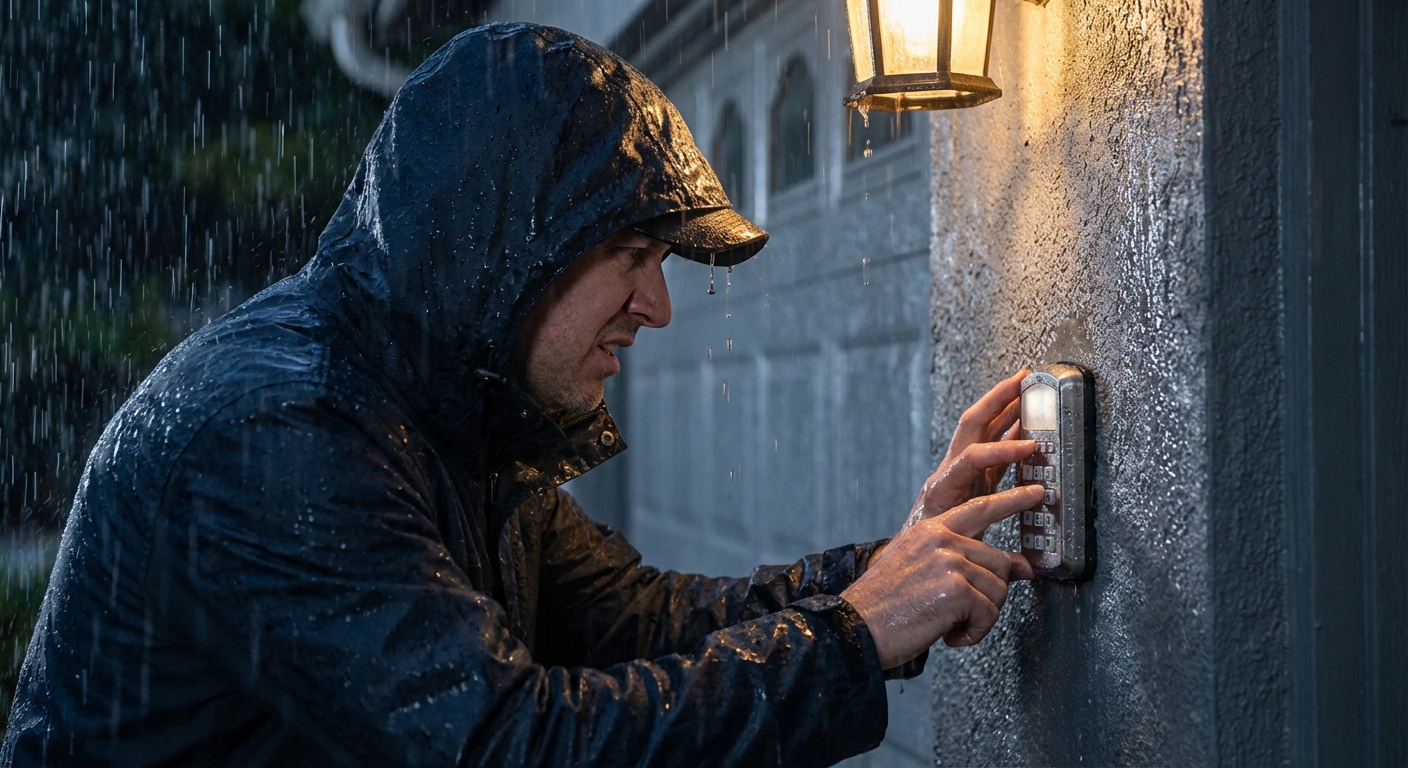
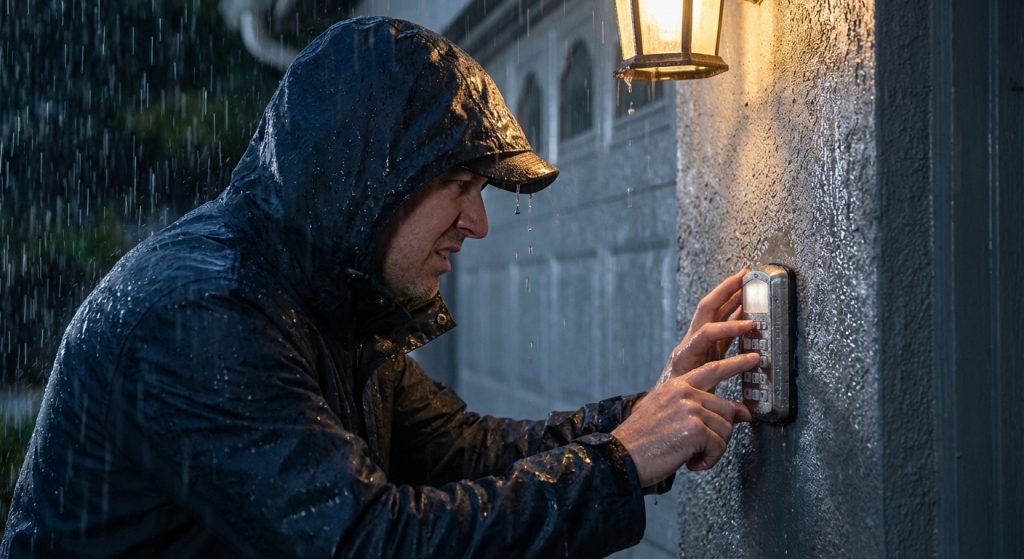
Picture this: You pull into your driveway after a long day, the notorious Pacific Northwest rain hammering down. You punch in your garage door code—nothing. You try again. Still nothing. Now you’re stuck outside, drenched, fumbling for your phone to call someone inside to let you in. If you live in Southwest Washington or the Portland metro area, this scenario is all too familiar. Garage door keypads are surprisingly vulnerable to our wet, chilly winters, and understanding why they fail can save you time, money, and a lot of frustration. In this article, you’ll learn:
- Why cold weather drains your keypad’s battery faster than you think
- How moisture causes hidden damage to the circuit board inside
- When a simple fix will work—and when it’s time to upgrade
- Why weather-sealed smart keypads are a game-changer for PNW homeowners
The Cold Hard Truth: Why Your Keypad Battery Dies in Winter (Even If It’s “New”)
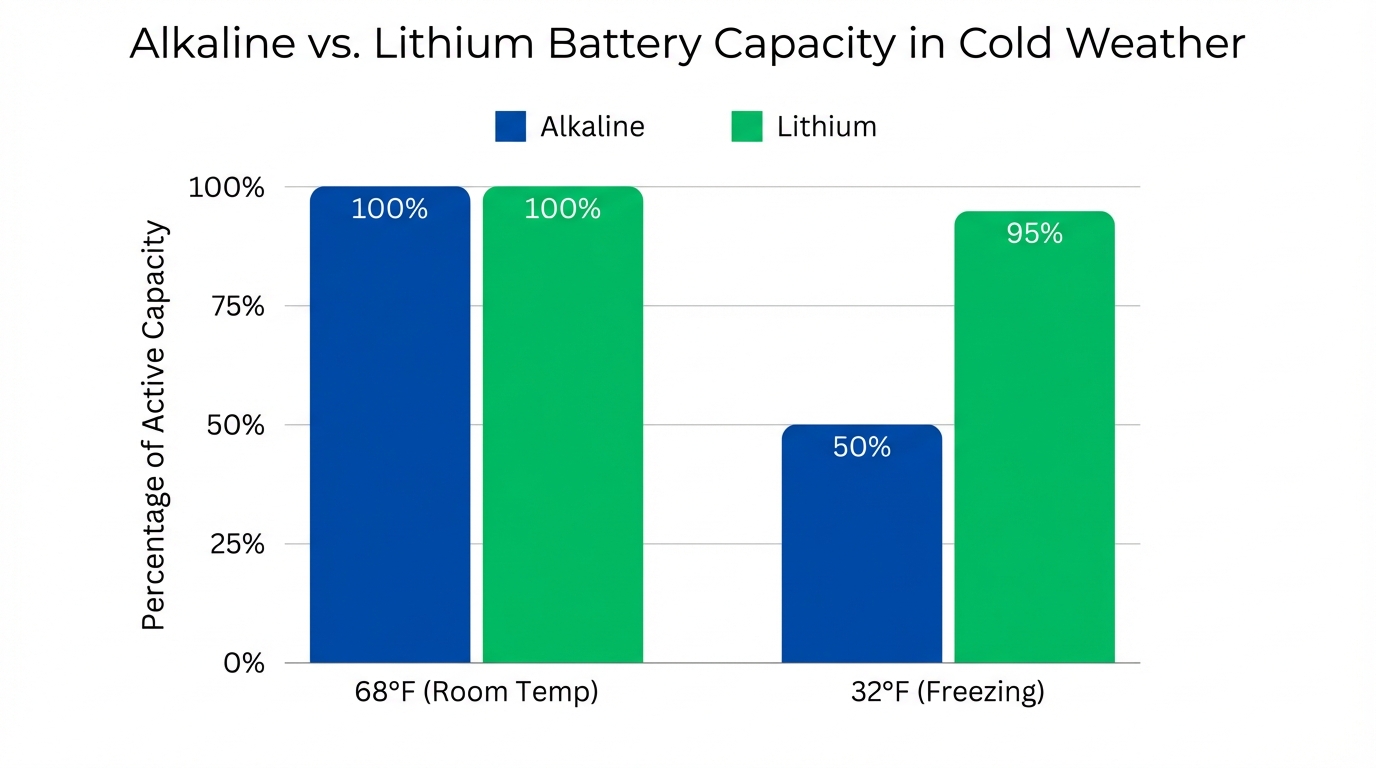
Most homeowners assume their keypad stopped working because water got inside. But often, the real culprit is cold weather draining your battery’s power—long before a single raindrop touches the device. Alkaline batteries lose up to 50% of their capacity at freezing temperatures (32°F). When your keypad tries to send a radio signal to the opener, the cold battery can’t deliver the sudden power surge it needs. This isn’t a manufacturing defect—it’s fundamental chemistry at work. Why this matters in Southwest Washington: Winter nights in Vancouver and Portland regularly drop to 33°F–40°F. Combined with our region’s 41 inches of annual rainfall, your keypad is fighting both cold and moisture at the same time. Here’s the chemistry breakdown: Alkaline batteries rely on a water-based potassium hydroxide electrolyte. As temperatures drop, the internal resistance increases, slowing the chemical reaction that produces electricity. Think of it like trying to pour honey straight from the refrigerator versus at room temperature—the cold makes everything sluggish. When you press a button on your keypad, the device demands a quick burst of power to transmit the RF (radio frequency) signal to your garage door opener. A cold battery experiences what’s called “voltage sag,” meaning it can’t maintain the voltage needed to complete the transmission. The result? You’re locked out.
💡 Actionable Insight
Switch to lithium batteries. Unlike alkaline batteries, lithium batteries maintain 95% of their capacity even at freezing temperatures. They cost a bit more upfront—typically $8-12 for a 9V lithium versus $3-5 for alkaline—but they’ll outlast alkaline batteries by years in outdoor conditions. For a device you depend on every day, it’s an investment worth making.
The Hidden Damage: How Rain Causes Invisible Circuit Board Corrosion
Even if your keypad seems dry on the outside, moisture can sneak inside and silently destroy the internal electronics—sometimes causing failures days or weeks after a storm.
How Water Gets Inside
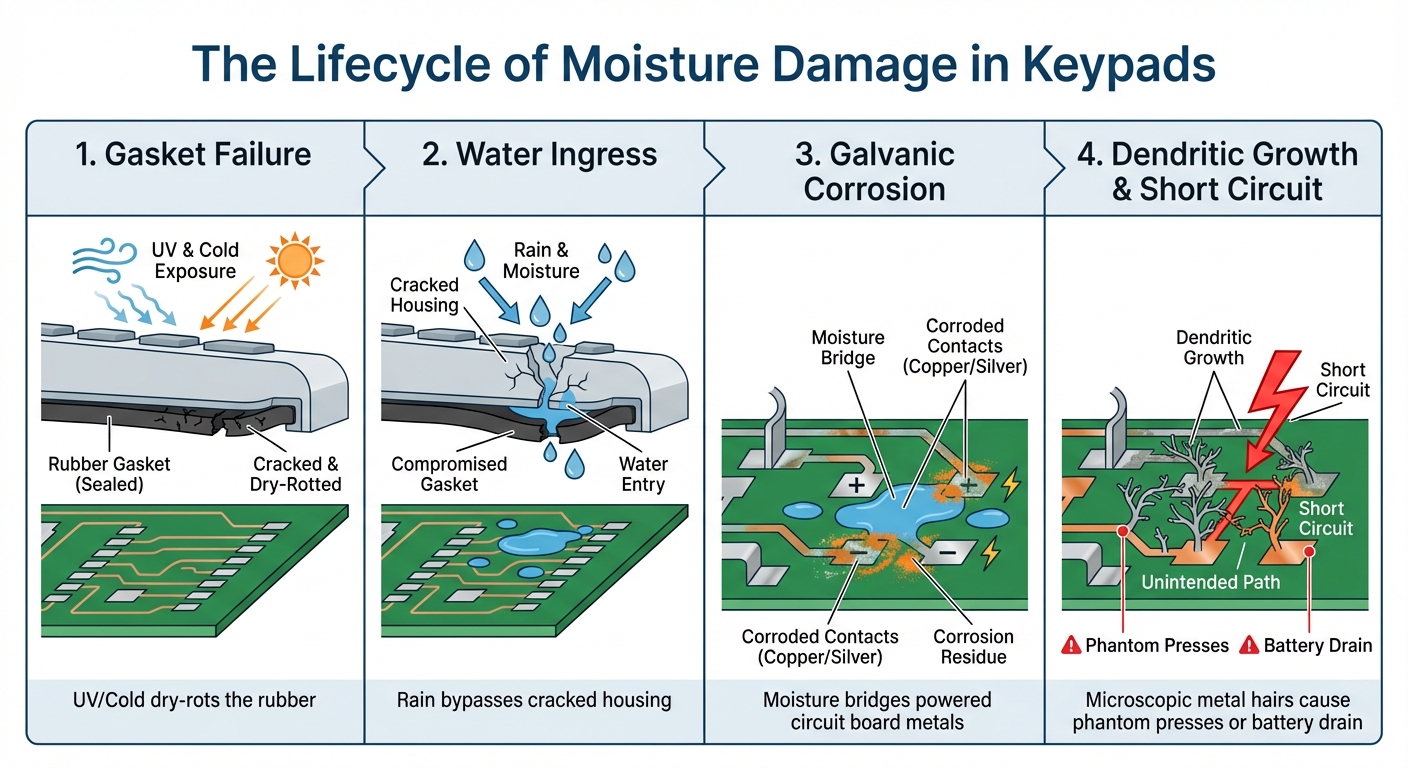
Standard garage door keypads use rubber gaskets that dry out and crack after 3–5 years of exposure to UV light (summer) and freezing temps (winter). Once compromised, wind-driven rain bypasses the housing with ease. You might not see visible water pooling inside, but micro-condensation is doing its damage.
Galvanic Corrosion Explained
When moisture bridges two conductive metals on a powered circuit board, it creates a microscopic “electrolytic cell.” Metal ions migrate between components, essentially eating away the copper traces on the board. This process is insidious because it happens gradually and invisibly.
Dendritic Growth—The Silent Killer
In high-humidity environments like our PNW winters, silver and copper on the circuit board form hair-like metallic structures called “dendrites.” Over time, these dendrites grow across the board like tiny metallic vines, eventually creating short circuits between components that should never be connected.
Symptoms of PCB Damage:
- Keypad registers phantom button presses (opening your garage randomly)
- Battery drains overnight even when not in use
- Keypad works intermittently—fine one day, completely dead the next
- LED backlight flickers or stays dimly lit when it shouldn’t
Real-World Example
In January 2023, a Clark County HOA experienced a 40% keypad failure rate across a 50-home subdivision after an “atmospheric river” event. Technicians discovered that 4-year-old rubber membranes had contracted in the cold, allowing moisture inside. Micro-condensation caused dendritic shorts on the circuit boards. Residents were frustrated—many had replaced batteries multiple times before discovering the real issue.
💡 Actionable Insight
If your keypad is acting erratic after a storm, don’t just change the battery—inspect the housing for cracks or gaps. If you see visible corrosion or water droplets inside when you open the battery compartment, it’s time for a replacement. Trying to “save” a corroded keypad is like putting a band-aid on a broken bone—it won’t solve the underlying problem.
DIY Fix or Time to Upgrade? How to Know If Your Keypad Is Salvageable
Not every wet keypad is a lost cause. Here’s how to troubleshoot at home—and when it’s smarter to invest in a replacement.
Step-by-Step Troubleshooting
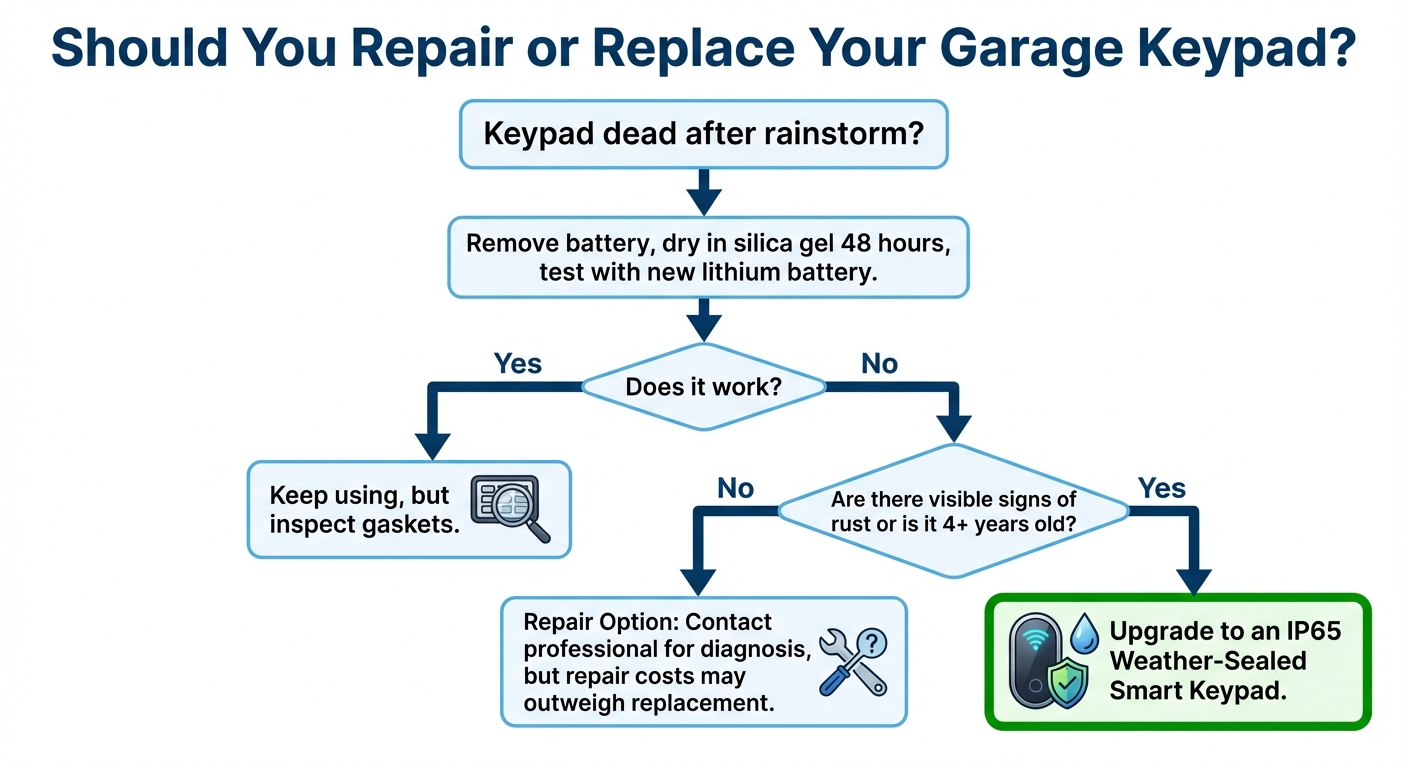
Step 1: Remove the battery immediately. Leaving a battery in a wet device accelerates corrosion. Even if the keypad appears to be working, moisture and electrical current create the perfect environment for rapid metal degradation. Step 2: Bring the keypad inside. Place it in a sealed container with silica gel packets for 24–48 hours to absorb residual moisture. Why silica gel instead of rice? Silica gel absorbs moisture more effectively and doesn’t leave behind starchy residue that can gum up electronic components. Step 3: Inspect for visible damage. If you see:
- White or green corrosion on metal contacts
- Rust on screws or internal components
- Cracked or brittle rubber gaskets
- Water stains on the circuit board
…it’s time for a replacement. These are signs of advanced degradation that cleaning won’t fix. Step 4: Test with a fresh lithium battery. If the keypad still doesn’t work after drying, the circuit board is likely compromised. Don’t waste time troubleshooting further—the internal damage is irreversible.
When Replacement Makes More Sense
Your keypad is 4+ years old: Rubber gaskets and plastic housings degrade over time, making future failures inevitable. Even if you get it working again, you’re likely looking at another failure within months. You’ve had repeated failures: If this is the second or third time your keypad has died after a storm, the housing is no longer weatherproof. You’re fighting a losing battle. You want smart home integration: Modern smart keypads offer app-based backup access, meaning you’ll never be locked out again—even if the physical keypad freezes over, gets covered in snow, or experiences battery failure.
Cost-Benefit Reality Check
A basic replacement keypad costs $30–$50, but you’ll likely face the same issue again in 2–3 years when the new gaskets start to fail. A weather-sealed smart keypad costs $80–$150 but offers superior weatherproofing, longer lifespan, and smartphone integration. Over a 10-year period, the smart keypad is actually the more economical choice—not to mention the convenience factor.
The Smart Upgrade: Why Weather-Sealed Keypads Are Built for Pacific Northwest Winters
If you’re tired of replacing your keypad every few years, it’s time to consider a weather-sealed smart keypad. These aren’t just “fancy tech”—they’re engineered to survive our climate.
What Makes Them Different?
IP55 or IP65 ratings: These Ingress Protection ratings mean the keypad is dust-tight and protected against heavy rain and water jets. An IP65-rated device can withstand low-pressure water jets from any direction—far exceeding what a typical rainstorm can throw at it. Conformal coating: A thin protective film is applied directly to the circuit board, preventing moisture, dust, and temperature extremes from causing damage. This coating creates a barrier that stops galvanic corrosion and dendritic growth before they can start. Superior gasket materials: Premium keypads use silicone or EPDM rubber gaskets that resist UV degradation and temperature extremes far better than standard rubber. These materials remain flexible even in freezing temperatures, maintaining their seal year after year.
Smart Integration Isn’t Just a Gimmick
Wi-Fi connectivity allows you to open your garage door via smartphone app—even if the physical keypad is frozen solid or covered in ice. Coming home to a storm? Open the door from your car before you even pull into the driveway. Real-time alerts: Get notified if your garage door is left open or if someone enters a code. This is especially valuable if you’re away from home and want to ensure your property is secure. Temporary access codes: Grant one-time or time-limited codes to delivery drivers, houseguests, or contractors. No more hiding keys under the mat or leaving your garage vulnerable.
Long-Term Cost Savings
A standard keypad might need replacement every 3–4 years at $40–$50 each. Over 15 years, that’s 4–5 replacements costing $160–$250 total. A weather-sealed smart keypad can last 10+ years with proper maintenance. At $80–$150 for a single unit, the lifetime cost is lower—and you get superior functionality.
Real-World Success Story
After the January 2023 atmospheric river event that devastated standard keypads across Clark County, the affected HOA upgraded to IP55-rated smart keypads with conformal-coated circuit boards. Result? Zero failures during the subsequent wet season, and residents loved the smartphone backup access. Many homeowners reported using the app more than the physical keypad, especially on particularly nasty weather days.
Recommended Options
LiftMaster / Chamberlain with myQ technology: Industry-leading smart integration and IP55 weather resistance. The myQ app is particularly user-friendly and integrates with other smart home platforms. Genie Aladdin Connect: Affordable smart keypad with solid weatherproofing. A great mid-range option for homeowners who want smart features without premium pricing. Smart Doors can help you select the right model for your specific needs and garage door system, ensuring compatibility and optimal performance.
5 Simple Maintenance Tips to Keep Your Keypad Working Year-Round
Even the best keypad needs a little TLC. Here’s how to maximize its lifespan and avoid future headaches.
1. Switch to Lithium Batteries—Seriously
We already covered this, but it’s worth repeating. Lithium batteries perform consistently in cold weather and last 3–5x longer than alkaline in outdoor conditions. Set a reminder to check your keypad battery every fall before the rainy season kicks in.
2. Inspect the Rubber Gasket Annually
Check for cracks, brittleness, or gaps. If you see damage, apply a thin bead of silicone sealant around the edges before the rainy season starts. Use clear, 100% silicone sealant (not latex caulk) for best results. This five-minute task can add years to your keypad’s life.
3. Clean the Keypad Every 6 Months
Use a damp cloth to wipe away dirt, spider webs, and debris. Avoid spraying water directly at the keypad—use a lightly dampened cloth instead. Pay special attention to the area around the buttons where dirt can accumulate and potentially compromise the seal.
4. Install Under an Eave or Add a Rain Shield
If your keypad is fully exposed to wind-driven rain, consider relocating it to a more sheltered location or installing a small protective awning. Even a simple plastic rain shield can dramatically reduce direct water exposure. The goal is to minimize the amount of standing water that can pool on top of the device.
5. Test It Monthly
Don’t wait until it fails to discover there’s a problem. Test your keypad once a month to ensure it’s responding correctly. If you notice sluggish response times, it could be an early sign of battery drain or internal moisture. Catching these issues early gives you time to address them before you’re locked out.
💡 Pro Tip for Southwest Washington Homeowners
Schedule an annual garage door maintenance check with Smart Doors. During these visits, technicians can inspect your keypad, lubricate your door’s moving parts, check spring tension, and catch small issues before they become expensive repairs. An ounce of prevention really is worth a pound of cure—especially when that “cure” involves being locked out in a rainstorm.
Final Thoughts
Your garage door keypad might seem like a minor convenience—until it stops working on a cold, rainy night. But now you know the truth: keypad failures in the Pacific Northwest aren’t just about water damage. They’re about cold-weather battery chemistry, hidden circuit board corrosion, and weatherproofing that wasn’t built for our climate.
Key Takeaways:
- Cold weather drains alkaline batteries by up to 50%—switch to lithium for reliable year-round performance
- Moisture causes galvanic corrosion and dendritic growth on circuit boards, leading to shorts and phantom button presses
- If your keypad is 4+ years old or has failed multiple times, replacement is more cost-effective than repeated repairs
- Weather-sealed smart keypads with IP65 ratings and conformal-coated boards are engineered to survive PNW winters—and offer smartphone backup access when you need it most
Don’t wait for the next atmospheric river to strand you outside your own garage. Whether you’re upgrading to a smart keypad or simply switching to lithium batteries, a little proactive maintenance goes a long way.
Ready to Upgrade Your Garage Keypad?
Need help choosing the right keypad or upgrading to a smart system? Our technicians understand the unique challenges of our local climate and can recommend solutions that actually work in the real world, not just on a specification sheet.
References:
- Energizer Holdings, Inc. (2023). Energizer Application Manual: Cylindrical Primary Lithium and Alkaline Batteries. Retrieved from https://data.energizer.com/pdfs/alkaline_appman.pdf
- IEEE Xplore. (2020). Electrochemical Migration and Dendritic Growth on Printed Circuit Boards in High Humidity. Retrieved from https://ieeexplore.ieee.org/document/8911245
- International Electrotechnical Commission (IEC). (2024). Understanding IP Ratings (IEC 60529). Retrieved from https://www.iec.ch/ip-ratings
- National Oceanic and Atmospheric Administration (NOAA). (2024). U.S. Climate Normals: Portland/Vancouver Region. Retrieved from https://www.ncei.noaa.gov/products/us-climate-normals
- Pacific Northwest National Laboratory (PNNL). (2022). Building Technologies: Moisture and Climate Impact. Retrieved from https://www.pnnl.gov/building-technologies
- Statista. (2024). Smart Home Market – Access Control Revenue and Adoption Rates in the United States. Retrieved from https://www.statista.com/outlook/dmo/smart-home/smart-appliances/smart-access-control/united-states